The quickest way to get started with Daminion is to import your media collection from your current digital photo management system.
Import from PicaJet 2
1. If Daminion and PicaJet are installed on the same computer
- Launch PicaJet
- Select the first file (this is a fix for a PicaJet bug)
- Navigate to File > Export > Entire Album as XML…
- Specify an XML file, for instance, ”album.xml”
- Launch Daminion
- Create a new catalog or open an existing one*
- Navigate to File > Import from > PicaJet 2 Album
- Locate the ”album.xml” and click OK
- When the window appears, specify the mapping rules
- Specify an XML file, for instance, ”album.xml”
- Launch Daminion
- Create a new catalog or open an existing one*
- Navigate to File > Import from > PicaJet 2 Album
- Locate the ”album.xml” and click OK
- When the window appears, specify the mapping rules
- You can import any of PicaJet’s top-level categories to different Daminion tags
- Click the Import button to complete the import process
* It is recommended that you create a catalog file in the same folder with your media files because Daminion stores relative paths to the media files. This will make it easier to move the media files and catalog folder to a new location later.
2. If Daminion and PicaJet are installed on different computers
- You must install Daminion on the same computer where PicaJet is installed. Then follow the above steps and create a new Daminion catalog in the folder where your media files are located:
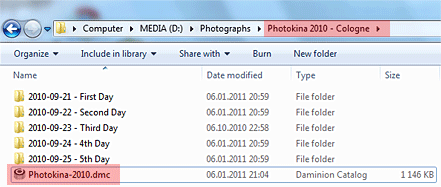
- Copy the parent folder (”Photokina 2010 – Cologne” seen on the screenshot) to your other computer.
- Make sure you have installed Daminion on your second computer.
- Open ”Photokina 2010 – Cologne” folder on the second computer and double click on the “Photokina-2010.dmc”.
Note: PicaJet FX can manage multiple albums so repeat the above steps for all the albums you want to import.