Digital Asset Management Solution for Higher Education
Centralize course materials, event photos, and research files for secure, organized collaboration

Centralize course materials, event photos, and research files for secure, organized collaboration











No more outdated materials circulating in the wild
Daminion helps organize, discover, and keep digital assets up-to-date to maintain smooth collaboration between departments.
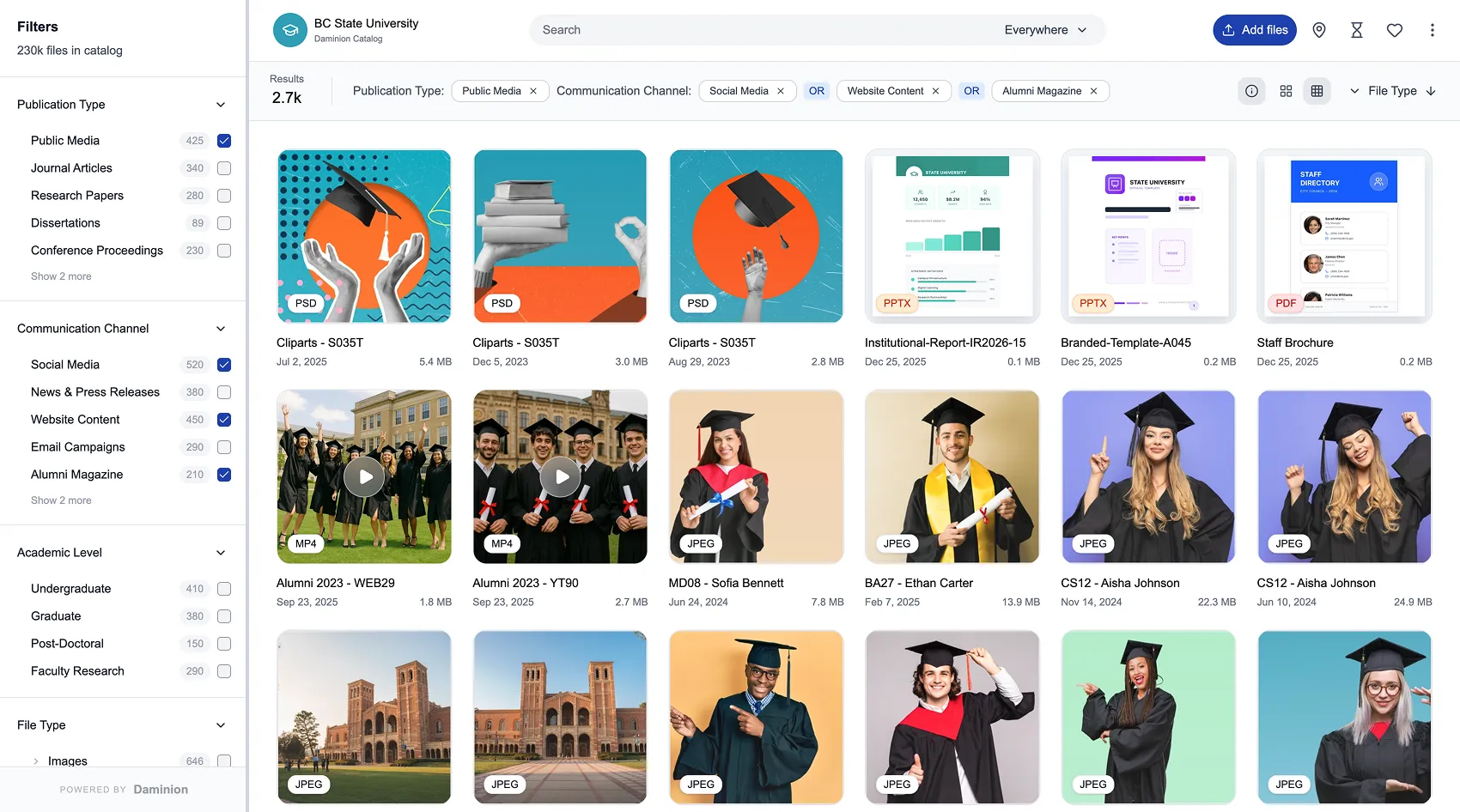
Organize and automatically tag media assets and documents, quickly find files, and collaborate on projects/
Daminion gives your communications team or research group one organized place for photos, videos, and other media that matter to your work: campus life, events, leadership, guest speakers, labs, and projects. Instead of chasing files across shared drives and personal folders, your team searches a single library and finds the right media in seconds.
Facial recognition groups photos by person, so you can quickly pull all images of a rector, dean, visiting lecturer, student ambassador, or lab member. It becomes much easier to prepare stories, profiles, and event recaps—and to avoid using photos of people who shouldn’t appear in public communications.
AI-generated tags and searchable transcripts help your team locate media by topic, place, event, or spoken phrase. You can search by building, program, lab, or a keyword from a speech or interview and jump straight to the most relevant images, video fragments, and soundbites for your website, campaigns, or emails.
By working from a curated library, your team doesn’t depend on random local folders or old archives. The same up-to-date campus scenes, portraits, lab shots, and event photos are reused across the website, social media, newsletters, and press materials, so your communications feel consistent and professional.
Assign roles for editing, approving, and using media so your communications team stays in control. Contributors can help upload and reuse content without risking accidental changes or misuse.
Our DAM solution for higher education institutions provides top-notch digital asset management features and runs on your infrastructure
Run Daminion on-premises or in a private cloud, simplifies locating assets using metadata, and supports diverse file formats.
Tested for handling catalogs with millions of assets, large media files, and complex tag hierarchies.
Designed for managing frequent revisions by cross-department teams, with comments and approval workflows.
Daminion makes course materials, event photos and videos, and research assets easy to find in a centralized, secure storage...
Find out how Daminion can help your departments keep digital assets organized and easily accessible
Dainion automatically extracts metadata from documents, images, and videos to make the files searchable. It can also tag photos automatically by analyzing the content with AI. Having this much metadata, you can easily narrow down your search and find the right assets in seconds.
Because Daminion uses a centralized storage system, everyone accesses the same latest revisions of all documents and media assets. When the marketing department updates the logo or the admissions department updates program brochures, all departments instantly see the latest versions. This way, nobody will use outdated materials.
Daminions creates a structured, searchable archive that grows with your institution. You can create custom categories like academic year, department, event type, and subject areas. Our digital asset management solution maintains this organization automatically, so materials from years ago are just as easy to discover as recently added content.
Yes, absolutely. A typical setup involves placing existing content on a NAS and indexing it with Daminion’s search engine. So the folder hierarchy remains intact, but now you can find files faster.
Yes, here is how Daminion can help you.
Our DAM system can manage and show both uncompressed TIFF files of 2D scans and mesh data of 3D scans in OBJ and glTF.
You can create custom metadata fields that match your cataloging requirements, such as provenance, conservation history, and exhibition records.
Finally, Daminion provides granular permission controls for different user types, such as curators, researchers, educators, the public, etc.
Daminion provides role-based access, where each role can have a unique set of privileges: editing the tag hierarchy, accessing and downloading assets, editing tags in assets, creating revisions, sharing assets with other people, and a lot more. You can also restrict access to specific parts of the catalog on a per-department or per-lab basis.
Daminion is designed for everyday users. For most people, the interaction will be limited to several operations: uploading new files, searching for existing assets, creating new versions, and downloading assets. We made the interface similar to what users already know from many other programs and online services. If you can use search filters on Amazon to find the product you need, you will have no problems finding the right files in Daminion.
Here is what our customers in the universities and research labs have to say about Daminion after years of using it
Daminion helps us to catalog a large amount of hi-res images and videos, and organize them in a quick and easy way to be able to retrieve them as we need it.
Instead of having pics spread across different locations, Daminion gives us a central access point to them and helps to find them quickly.

We used to have a different software which wasn’t as user-friendly as Daminion. Using Daminion helps us to be more efficient in working with images and saves a lot of time because we can have everything in one place now. Daminion is a step forward for us from what we had and we are convinced it is a great solution.

I think the benefit is that you’ve got easy access to all your digital assets, and I’m a firm believer in keeping all your images in-house and not having them floating around. You want to keep your information nice and secure when it comes to your images.
A great feature is that multiple users can access and make changes to images, but with everything in one place and version control history, you can see exactly who made those changes and when.

Before Daminion, we would spend hours searching for the right file to use in our presentations. We did try a different application, but we found it difficult to navigate.

Our team is here to answer your questions, understand your challenges, and show you how Daminion can help.