Daminion 2.0 Release version is now officially available to download.
Although the release version has only just become available, hundreds of organizations, (including NASDAQ listed companies) and thousands of individuals already trust the management of their media content to Daminion. This is something we are very proud of, and it will encourage us to continue improving our product, making it better and better with each new version.
Below is a list of improvements and bug-fixes implemented since the last minor update. As always, you are very welcome to share your feedback on our users’ forum or with us directly via the support form.
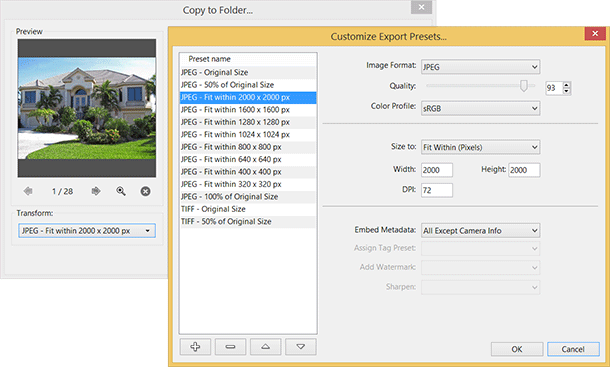
Improved Export
Daminion can now preserve image metadata while exporting images
It’s possible to export images to sRGB profile or preserve a source image ICC profile
Export preset editor that allows you to customize your export transformation presets
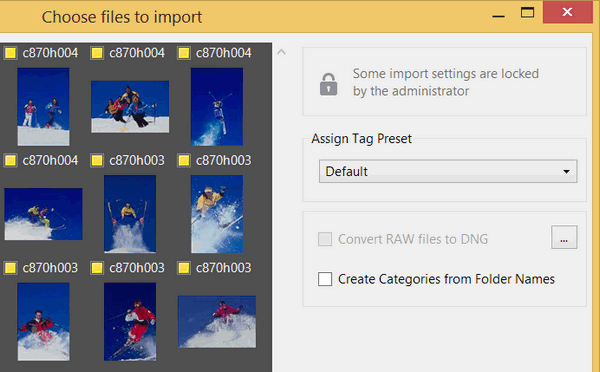
Lock Import Settings
Some import settings (file and folder naming rules, a way of importing) can be locked by the administrator (“Catalog > Import Settings”)
User-based User Interface customization
Interface settings are now stored inside the catalog individually for each user so you can see your customizations by logging in from any computer.
Experimental Dropbox integration
This experimental feature allows you to share your images with various devices such as Tablets, Macs, Mobiles or the Web. For example, you can select 50 Camera RAW images, drag them to a tag named PublishDropboxMyIPADPresentation and all your images will be converted to iPAD-friendly JPEG format with 2000px resolution that can be found in the DropboxMyIPADPresentation. All image conversions and image optimizations will be performed on the fly. To remove an image, just clear this tag. The publishing process will be under your control: you will see which images have been published and where.
Please be aware that this is an experimental feature aimed at getting your feedback. To activate this feature go to the main menu: Help > Experimental > Create Publish Panel. Take a look at this short video demonstrating the Dropbox add-on in action and don’t forget to share your feedback (no matter whether it’s positive or negative):
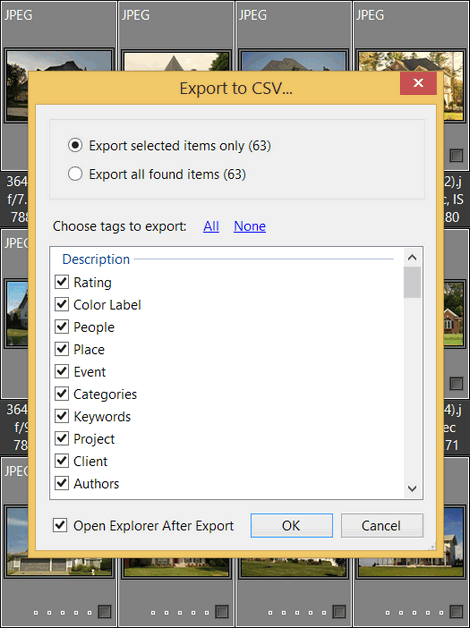
Export to CSV
In addition to the “Import from CSV” feature it’s now possible to export media document tags to a CSV document (Comma Separated Values).
Added 15k limitation to Daminion Standalone version
Daminion’s test period is over; however, you can still continue to use Daminion for free, with one limitation: you can import a maximum of 15k files per catalog. There are several ways to increase this limit: https://daminion.net/order/buy-daminion.
Our active contributors are eligible to receive free Daminion Standalone licenses. Each case will be considered individually – please contact us by a method you’ve already used to communicate with us.
Other Improvements
Daminion can now search through tag parents (even if they are not directly assigned to files) in the following tags: Folders, Keywords, Categories, People, Place, Event. For example, searching by “plant” now finds all images that were directly assigned to the “plantsoak” keyword (but not to the “plants” keywords)
Improved support for PDF files
It’s now possible to Switch Off display for a number of assigned files in the Tags panel
Better handling of XMP in RAW images
Added support for MPEG-TS format
Added 2 new video tags: Frame Rate and Bit Rate (will be available in the newly created catalogs)
Advanced Search now searches tag parents for all tags except the “Everywhere” option
After being created, Custom Tags will now appear in the Tags and Properties panels
You can now use the Paste command (Ctrl + V) to enter information into the “Folder to Store Uploaded Files” field in the Administrative panel
A hint is now displayed for large truncated captions below Thumbnails
“UsersPublicMyDocuments” is now the default folder for storing uploaded files (instead of the ProgramData folder)
It’s now possible to give meaningful names to shared catalogs (instead of the default “NetCatalog”)
Tags with the same values (folders, media format, color label, rating) are now displayed in the Properties panel when multiple items are selected
Tag values from tag presets can now be used in the renaming templates in the Import window
Improved “Re-link Folder” feature
You can now use the context menu to find images assigned to a GPS Group marker
Improved “Assign Tags” mode in the Catalog tags panel.
Added new commands to reset user interface customizations: “Window > Reset Window Layouts” and “View > Reset User Interface”
Added support for some OLYMPUS camera maker notes
Added support for Jpeg2000 with native 8 bit and 16 bit gray scale images
GPS Info for video files is now displayed in the Properties panel
Ordered main menu items
It is no longer possible to remove items that have been checked out by other users, unless you are the Administrator or the owner of the items.
Tag names are now aligned more accurately in the Properties panel
Improved Properties panel
It’s now possible to return focus back to the Thumbnail or Full Screen view from the Properties Panel using the Esc key (but only if no changes have been made in the Properties panel)
Added “Maximize” option to the Map panel
It’s now possible to display GPS markers for found images only (not for all images in the catalog)
Optimized loading of GPS markers for a large number of files
It’s possible now to change sorting order for tags in the server based catalogs
Minor improvements
Updated Translations
Updated Spanish translation by Jose Angel Calvo
Updated French translation by Reynaud Lionel
Updated Dutch translation by Peter Gebruers
Updated German translation by Uwe Noack and Sedat Yakisir
Fixed Bugs
Color management now works correctly
Fixed memory leak bug while scrolling thumbnails
Fixed bug when cropped RAW images were not correctly displayed
Fixed problem with Google Maps (Google changed their algorithm)
Fixed bug with duplicated folder names in the tags panel
Map provider and type of map now restore their states after the program restarts
Fixed bug when multi-line Descriptions below the thumbnails were cut
Fixed bug when different tag presets displayed for different selected interface languages
Property panel fields can no longer be edited by Viewer or Guest roles
Fixed bug with thumbnails disappearing after returning from full screen mode
Fixed bug with filtering catalog tags using national symbols
Fixed bug that disconnected client from the server after “Sign Out” command
Fixed bug with Default Admin Settings (like ports, etc…)
Fixed bug with Places in the Properties panel
Fixed bug with incorrect reading of Umlaut symbols from RAW images.
Fixed bug with Checking Out multiple itemsv
Fixed bug with Compare Items
Fixed bug with comparing cropped RAW Images
Fixed bug that made it impossible for users with the Editor role to drag images to the Map
Fixed bug when reading XMP from sidecar files of RAW images
Fixed bug when merging two tags
Advanced Search: now only Equals and Not Equals operations are available for the “Check Out To” tag
EXIF Orientation tag now resets after rotating to 0 degree, even if Compatibility mode is not checked.
Fixed bug with “Check In” in the server catalogs
Fixed bug with adding a new Place in the tags tree
Fixed bug when Daminion client couldn’t open shared catalog due to server and client time mismatch
Fixed bug when tags were not read from the metadata of uploaded images
Fixed default icon rendering issue for some formats
Fixed minor memory leaks issue while working with the Properties panel
Fixed memory leaks while importing PDF documents
Fixed bug reading some images with ICC Profile on 64 bit Windows versions
Fixed bug reading TIFF CIELab images with embedded ICC profile
Fixed bug with reading some jp2 images
Fixed memory leaks while reading some corrupted PNG images
Fixed bug with reading some TIFF-jpeg images
Fixed bug when hotkeys didn’t work for Open/Edit With menus
Fixed problem with licensing Server version
“Show All metadata” now works for files that contain Unicode symbols in the filename
Hint with admin/admin message no longer displays when Admin user is disabled
Fixed minor issue when incorrect info was written into the Comments field of RAW images
Fixed minor bug with wrong focused item after exiting full screen view
Fixed problem with pressing the “T” key in Film Strip mode
Fixed bug related to FIPS compliance
Fixed issue with Properties Panel disappearing in full view mode after pressing the Ctrl + D
Daminion now saves the state of expanded tags in the Folders panel
Fixed bug that prevented rotation of images exported by Daminion via Windows Explorer
Fixed minor issue of freezing when reading Camera RAW images with Daminion Server catalogs
Fixed bug with incorrect rounding of ISO values for some Canon cameras
Murat Korkmaz is CEO and co-founder of Daminion. He has been working on the same problem since 2003 — helping teams find the files they already own. The first version shipped as PicaJet, a single-user cataloguing tool for photographers, designers and marketers; customers kept asking for a version their whole team could use, and that request became Daminion, the on-premise DAM the company builds today.
He writes here about product decisions and their trade-offs: why a feature shipped the way it did, where the DAM category is heading, and which problems software actually solves versus the ones that need a change in how a team works. Product claims in articles published on this site are reviewed by him before release.
Based in Hallandale Beach, Florida. He posts more frequently on LinkedIn: https://www.linkedin.com/in/korkmazov/