
Daminion 9.0 Release. What’s New?


The latest version, Daminion 9.0, focuses on enhancing the user experience for teams in marketing, design, production, and sales. Key developments include advanced search features and new capabilities for 3D model preview and management.
Alongside these major updates, Daminion 9.0 also brings a more robust video player for web clients and improved metadata handling. These upgrades, combined with numerous smaller enhancements, contribute to a more efficient and convenient use of the software.
Major Improvements
Efficient 3D File Management
With the new Preview Agent, Daminion enhances the management of proprietary 3D formats by enabling the creation of previews and proxy files. This feature facilitates easy viewing of 3D content on both web and desktop platforms, streamlining your workflow and saving valuable time.
Added support for new 3D formats: STP, C4D, USD
Enhanced 3D Viewing Experience
The improved 3D file viewing on desktop and web platforms offers a more intuitive and engaging way to interact with 3D files. You can now smoothly rotate 3D models, quickly generate eye-catching thumbnails, and capture high-quality screenshots, enhancing your creative and presentation capabilities.
Optimized Web Search Functionality
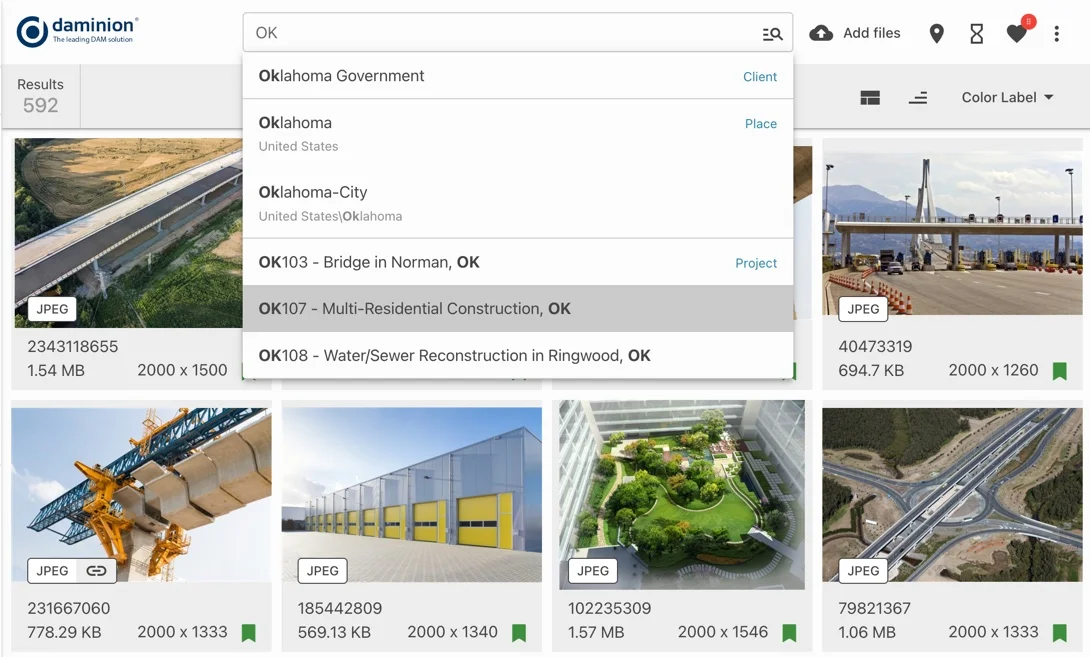
The introduction of the quick search suggester in the web client significantly speeds up the process of locating files. This tool makes your search more efficient, allowing you to find the assets you need quickly and with greater accuracy, improving overall productivity
Enhanced Video Playback Experience
The updated video player in Daminion offers an array of improvements for a more seamless and enjoyable viewing experience. Key enhancements include:
- Uninterrupted Pauses: The video remains fully visible when paused, eliminating the dimming effect for a clear viewing experience.
- Sleek Volume Controls: For screens under 500px wide, the volume control is discreetly hidden, optimizing screen space.
- Intuitive Interaction: Media player controls vanish after 3 seconds of inactivity, ensuring a clean interface.
- Immersive Full-Screen Viewing: Full-screen viewing capability is added for an enhanced, immersive experience.
- Accurate Progress Display: The progress bar now reflects your viewing accurately, making it easier to track.
- Effortless Playback Control: Use the space bar for simple play and pause control, adding convenience.
- Precise Scrubbing: Navigate your media with the left and right arrow keys for precise control over playback.
Minor Improvements
- Unified Tagging System: Daminion now enables mapping of third-party tags like XMP and EXIF to Daminion custom tags, fostering a cohesive and streamlined organization of assets.
- Optimized Web Preview Experience: Experience enhanced performance with a smoother and faster fullscreen preview in the web client, making asset exploration more efficient and enjoyable.
- Added Support for Serif Affinity formats: Affinity Photo (.afphoto), Affinity Designer (.afdesign), Affinity Publisher (.afpub)
Improvements in the WEB client
Enhanced Video Thumbnail Experience
Enjoy dynamic video previews when hovering over thumbnails, offering a more engaging and informative browsing experience.
License Management Enhancements
Files with expired licenses are now automatically omitted from shared collections, ensuring a current and compliant browsing experience.
Intuitive Tag Management Update
The “Select all” checkbox resets when the tag filter changes, preventing unintended tag applications.
Improved Tag Visibility
Experience a user-friendly filter panel with increased display height for tag values, facilitating easier and more comprehensive tag management.
Efficient Tag Value Search
A new toggle in the filter panel simplifies finding specific tag values, enhancing search efficiency.
Proactive Notifications for License Expiry
Receive immediate notifications for any files with expired licenses in shared collections, promoting transparency and proactive management.
Improvements in the Desktop client
Enhanced Import Filters
In Import Filters, you now have the flexibility to exclude a folder with specific file types. This granular control allows for a more tailored and efficient management of imported content.
Custom Installation Path
Choose your installation path for the new client when installing as an administrator and without a pre-existing client, enhancing your installation experience.
Bug Fixes
- Resolved issue with Tag Access Restrictions being incorrectly applied from deleted roles.
- Manual rescan now accurately updates to reflect file changes.
- Fixed problems related to PSD CMYK files.
- Addressed an error that occurred when adding more than 150 users to an ad group.
- Resolved issues with CSV import functionality.
- Web login process no longer causes role resets.
- Improved accuracy in reading GPS tags.
- The Creation Date time is now correctly read, irrespective of negative server time zones.
- Fixed errors that occurred when moving files between catalogs.
- Tags are now properly written to PDF files.
- The Dominant Color tag is displayed consistently across all catalogs.
- Resolved issues in reading and writing custom tags.
- Addressed errors during the restoration of backups from PostgreSQL 10.

Explore our DAM system
with your personal manager
demo from your dedicated manager.