
Daminion 0.8.3 released


To get the latest version of the program visit our Download page.
Considerable efforts have been put into fixing bugs and optimizing the program. On top of that, we’ve been developing a multi-user network version. The Daminion Server Lite version is currently undergoing tests from our testers and we’ve even added several new features!
What’s new in this version?
- We’ve added a new panel to display the active query filter. In the past, if your catalog contained a large number of tags there were times when you couldn’t see all the ones you’d selected. Several people have mentioned this to us, so now we’ve changed it and it’s up and running.
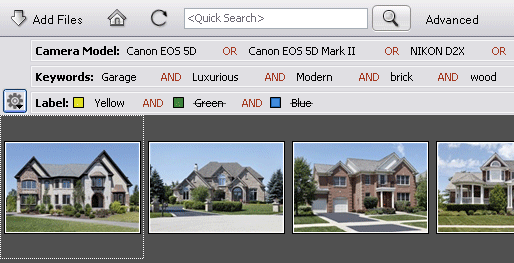 The panel enables you not only to display the current query but also to remove the tags and switch the Boolean operations between – AND/OR. For more complex manipulations press the Advanced button.
Tags are formatted depending on query conditions (some of them can be chosen from the Advanced Search Dialog form only). I use the keyword “Winter Garden” as the example tag.
Condition Display as Matches Winter Garden Does not match Winter GardenContains *Winter Garden* Does not contain *Winter Garden*Starts with Winter Garden* Is not empty UnassignedIs empty Unassigned For example tags that have been excluded from the query will be displayed with a strikethrough, and tags with the “Contains” query condition will be displayed between asterisks.
-
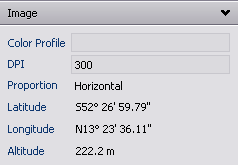
We’ve added the display of GPS coordinates (GPS Latitude, GPS Longitude, and GPS Altitude) as text. The ability to display and search for GPS coordinates is available on the current program version (works on newly created catalogs). When we get some free time (or a pile of requests) we’ll add Google Maps or MS Bing.
- We’ve added Hot Keys for quick tag selection:
- To show files with “TagX”, hold Ctrl and click on the TagX option.
- To hide files with “TagX”, hold Ctrl + Alt and click on the TagX option.
- And finally (for the time being!), we’ve added support for MTS and M2TS video format. It’s based on the MPEG2 format and is used for high-definition video on Blu-Ray Discs. Sony and Panasonic use this format on their camcorders.
- Quick search condition now reflects on filtering content by selected catalog tags
- Low resolution images are now printed correctly
- Fixed bug when adding files to the Tray panel
- Fixed bug when closing a catalog that contains any corrupted file formats
- Fixed a few bugs related to moving files between catalogs
- Improved and optimized tag statistic calculation
- Fixed bug when removal of tags is not reflected in the file metadata
- Fixed a few bugs during export
- Fixed bug that prevented some folders being displayed in the Catalog Tags Panel
- Resolved about 20 other minor issues
Try a new version of Daminion now!



Explore our DAM system
with your personal manager
demo from your dedicated manager.