New Daminion 3.7: Faster Viewing, Easier Administration, Better Organization
Murat Korkmaz
October 9, 2025
4 min read
In This Article
Share with friends
The new Daminion 3.7 version features more than 20 improvements including faster viewing of large images, easier Daminion Server administration, grouping of similar images, and additional file format support. Plus several minor bug fixes.
Top 5 Improvements
Large images can be displayed much faster – at the same speed as common JPEG images. Learn more…
Integration with Windows Active Directory enables you to sync the Daminion Server with the company’s existing user database instead of manually entering user names and passwords. Users, in their turn, can be logged-in to Daminion Server by specifying their Windows NT/Active Directory passwords. Learn more…
Similar images can now be grouped together and displayed more compactly, reducing the number of steps required to access your assets. Learn more…
Added support for new media formats including MXF videos and Samsung SRW images. And you can now display quality thumbnails for Cineform video and AutoCAD (DXF/DWG) formats.
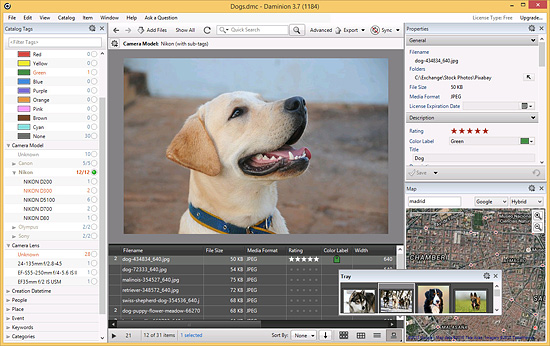
The Tray (Lightbox) panel has been drastically improved and now, apart from saving its state after restarting the Daminion Client, it allows you to assign tags, save images as collections, and export images directly from the Tray. For server catalogs you can even connect from another computer and see your Tray files.
Other Improvements
Improved thumbnail display performance
Improved “Import from CSV” option
Added support for importing hierarchical ACDSee categories
Map location names are now localized
It’s now possible to use the underscore “_” symbol when searching
REST API: Multiple tag values are now displayed separated by commas (this will be revisited soon)
Daminion restores last selected tags when server catalogs are re-opened by users with Viewer and Guest roles
Improved TIFF file handling
Limitation on exporting large images removed
When connecting to the server, Daminion checks whether .NET 3.5 is installed in the client PC
When selecting multiple files using the CTRL key, the Preview panel displays the currently selected picture
The “Add Tag” Dialog can now be closed with the ESC key
Alt + Clicking in the Properties panel selects the clicked tag in the tag tree
Updated MPlayer from 37242 to 37368 version
Updated DCRAW to 9.22 version (Fuji X-Trans filters are finally supported)
Updated VIPS to 7.42.2 version
Bug fixes
Fixed minor bug with displaying black screen when viewing RAW images
Fixed a bug when Daminion Clients disconnected from the Server when filtering tag tree
Fixed a minor issue with rendering Camera RAW images
Fixed bug with rendering RAW thumbnails when more than 2 shared catalogs were created in the Admin panel
Fixed bug when sorting by “Imported By” command.
Fixed bug with display of some TIFF files
Fixed bug with incorrectly stretched video thumbnails
Fixed bug with creation of PDF Contact Sheets containing TIFFs or Vector images
The “Update Thumbnail” command now updates the File Size (along with the Dimension info)
Fixed bug when updating Preview panel and file dimension info after updating thumbnails of files edited outside Daminion.
REST API: Now works
REST API: GET “mediaitems/?savedSearchesId=” method now works
REST API: REST API commands can now be invoked from the browser by pure JavaScript
REST API: fixed bug when tag values were equal to formatted tag values
REST API: fixed bug with calling “GET mediaitems/?savedSearchesId=” from web browsers
REST API: The optional “tags=none” parameter now works for the “GET mediaitems/?savedSearchesId=”
Fixed bug when groups are displayed in the “Recently Assigned Tags” panel
Fixed bug when Users with the Viewer role couldn’t add images to the Tray
Fixed bug with importing some CSV files
Fixed bug when Ctrl + Shift + P didn’t work
Fixed minor issue with the “Find image on the Internet” command
Fixed minor issue with the “Recently Assigned Tags” panel
Fixed bug when updating from one of the previous local database versions
Fixed bug with Auto-Rescan Folder Setting
Fixed bug with Daminion Reseller tracking
Fixed minor bug when exporting items
Alt+TAB keys can now switch back into the Compare Items window
Fixed a bug when Preview was not updated after rebuilding thumbnails
Fixed a bug when a wrong helper context menu was displayed for the Place tag in the Properties panel
Fixed bug with the Properties panel after right clicking on a tag when multiple files were selected
Fixed minor bug with displaying hint for the Places tag in the right panel
Several minor bug fixes
Special Big Thanks to our Contributors:
Uwe Noack and Sedat Yakisir, for translating new German strings
Jose Angel Calvo, for translating new Spanish strings
Kees Hessels, for translating new Dutch strings
Mariusz Lewandowski, for translating new Polish strings
Lionel Reynaud and Alain Pierre, for translating new French strings
CEO and Co-Founder of Daminion. Here I share insights into how we build and evolve the product, thoughts on the DAM industry, and practical ideas to help you bring order to your files. I hope these reflections make managing your digital assets a little clearer — and a lot easier.