
Daminion 5.0 Released


This latest version of Daminion has 8 major improvements including a new fully-functional Web Client version, faster image preview, support for Active Directory groups, user roles on a per-catalog basis, improved XMP support, several bug fixes and a lot of minor improvements.
Major Improvements
1.Improved Web-Client
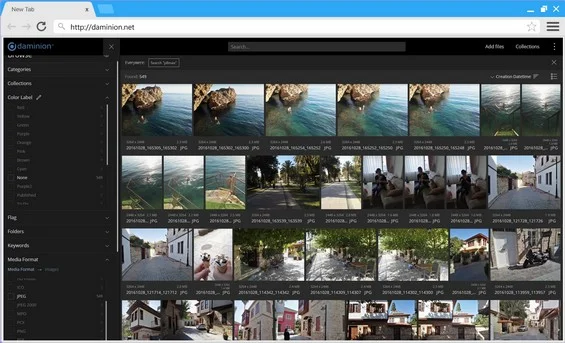
The new Web Client covers up to 50% of Daminion Desktop Client’s most frequently used functionality and enables ongoing and smooth workflow for PC, Mac, Smartphone and Tablet users, and includes the following features:
-
- Import files directly via Web Client, regardless of file format and file size.
- User management directly via Web Client. No need to bother your IT admin with requests to add new users or change roles for existing ones. User Management is only available for users with Admin access rights, and it works in exactly the same way as in the Daminion Server Administration panel. Learn more about User Management in Web Client.
-
- Customize your Web Client according to your brand style by setting the catalog main color scheme, adding your company logo, selecting a language and choosing accent colors. Learn more about how to Customize the Web Client Interface.
- Assign, Edit and Delete tags in batches via the Thumbnail Browser or individually via the Properties Panel. Learn more about Tagging in Web Client
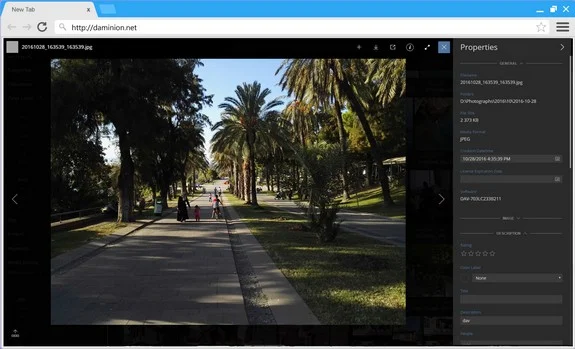
- Search your assets thoroughly and precisely using search tips. Learn more about how to use Filtering and Searching in Web Client.
- Share collections, queries or individual media via copying the web-browser’s URL
- Provide your clients with login-free access to your catalog. Readonly access will be granted to such users, enabling them to search and view files, as well as show all metadata tags and change the interface language. Learn more about login-free access to Web Client.
- Customize the Tags Panel to display the most frequently used tags including only custom tags created in Daminion Desktop Client.
2. Support for Windows and Active Directory groups
Great addition for IT Admins. You no longer need to register AD Users in Daminion Server one at a time, nor do you have to track their consistency. Just specify which AD group should be mapped to which Daminion Role. Learn more about Daminion Security Modes.
3. Auto-Import folder
Files can now be imported into Daminion without using Daminion desktop or web-clients: via FTP, by copying files to a network folder or by sharing images on your smartphone using Dropbox or Google Drive. In the latter case you will need to set a Dropbox/Google Drive folder as an Auto-Import Folder in Daminion Server. Once done, all new files in this folder will be automatically uploaded to your Daminion Server.
Learn more about Auto-Import folder.
4. Import to a selected folder
This small but time-saving feature allows you to upload new files directly to a folder selected in the Tags Tree of your Daminion Client. Learn more about Importing to a Selected Folder.
5. Faster Image Preview
Previewing images in Web-Client and Desktop Client can now be blazingly fast.
Medium-res JPEG previews significantly speed up the process. Before being previewed for the first time, an image takes a moment to renderer; however, all subsequent viewings are instant. The load on your server PC will be drastically reduced so that even more users than before can connect to Daminion Server with no effect on performance
6. See how well your catalog is organized
Files without metadata tags can be very hard to find. A new report, accessible via Catalog > Analyze, helps you to identify how well your catalog is organized and to keep an eye on important factors that may impact on the effectiveness of team members who frequently search for files in your media library.
7. Improved XMP support
- Added XMP support for GIF images (read/write)
- Added XMP support for MP4 videos from Google Nexus 5
- Improved XMP support for SVG images
8. User roles on a per-catalog basis
User Roles can be varied for different catalogs. One user can be assigned the role of Editor for one catalog and the role of Guest for another. Learn more about user roles on a per-catalog basis.
Minor Improvements
- Localized Daminion Web-Client
- Added Full-Screen button to Web-Client
- Better thumbnail visualization in Web-Client (as masonry)
- Added ability to save the state of the Thumbnail List below the large image in Web-Client.
- Eliminated dependencies from 2.0 and 3.5 .NET Frameworks
- The “Group by” panel is now collapsed by default in the Import dialog window
- Sort order icons now display the current sort order
- Changed default OR to AND operator when selecting multiple tag values in the Tags panel
- Items can now be sorted by Last Tag Changes
- Files in the Tray can now be dragged directly into folders in the Tag Tree
- Duplicate tag values in the Tag Tree (focal length, ISO) are merged automatically after the upgrade
Bug Fixes
- Fixed bug with updating metadata in some TIFF files
- Fixed bug with failed export of resized TIFF and JPEG files
- Minor bug fixes with handling XMP metadata
- Fixed bug with displaying a question mark by offline or missing files
- Fixed minor bug with clearing the Place tag for two items if there is no full match in this tag
- Fixed bugs with CSV import
- Fixed bug with insufficient tokens when renaming files while importing.
- Fixed bug when synchronization starts right after the auto-rescan is switched off
- Fixed typo in the shortcut for “Add to selected files”
- Fixed bug with the wrong Sort By File Size for local catalogs
- Minor bug fixes
Try a new version of Daminion now!



Explore our DAM system
with your personal manager
demo from your dedicated manager.