October 9, 2025
Updated



How often do you find yourself lost in a maze of digital files, struggling to locate that one crucial document? If the answer is “too often,” you’re facing a challenge that plagues organizations across various industries: the efficient management of digital assets.
This isn’t merely a matter of convenience; it’s a critical business function. Poorly managed assets can lead to inefficiencies, increased operational costs, and even missed opportunities. But here’s the silver lining: an effective tagging system can transform this chaos into a streamlined, easily navigable digital environment.
However, one size doesn’t fit all. The tagging strategies that optimize a law firm’s workflow may not be applicable for a creative agency. This article aims to guide you through the complexities of setting up a tagging system that’s not just efficient but also tailored to your organization’s specific needs.
Ready to transform the way you manage your digital assets?
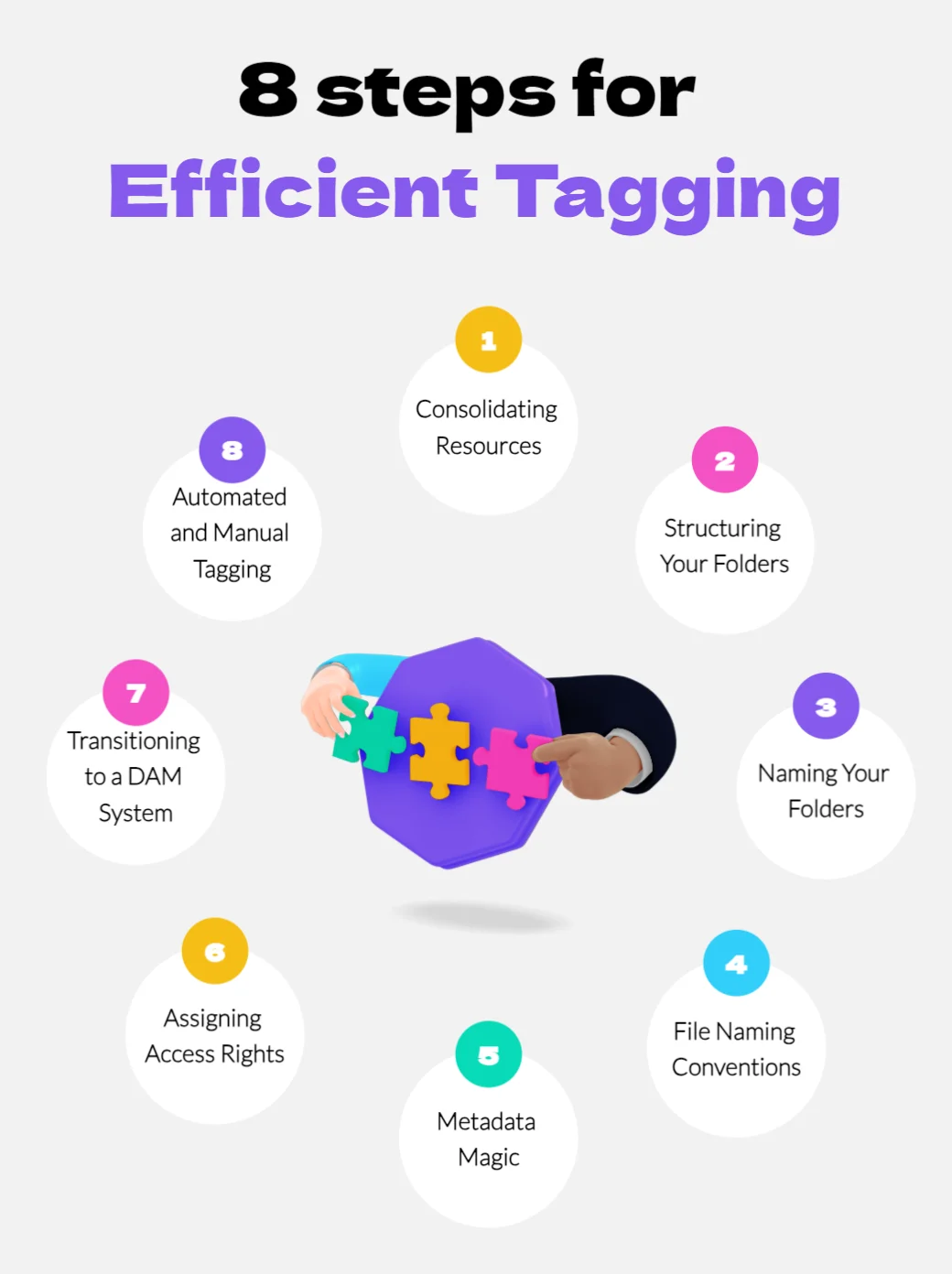
Ever wondered why even the best plans often fail? It’s usually because they start on shaky ground. The same principle applies to digital asset management. Before diving into tagging, it’s crucial to gather all your digital files into a centralized repository. This isn’t just a preliminary step; it’s the foundation of your entire tagging strategy.
Imagine trying to build a house without first laying a solid foundation. You wouldn’t get far, would you? Similarly, a centralized resource pool acts as the bedrock upon which your tagging system will stand. It eliminates the risk of duplicate files, ensures data consistency, and simplifies access for all team members.
By taking these steps, you’re not just organizing your files; you’re setting the stage for a tagging system that’s both efficient and effective.
Once you’ve consolidated your resources, the next logical step is to organize them. But here’s where many go wrong: they either overcomplicate the folder structure or oversimplify it. The key is to find a balance that suits your organization’s specific needs.
Think of your centralized repository as a library. A well-structured library makes it easy to find a specific book, even if you don’t know its exact location. Similarly, a well-thought-out folder structure enables quick and efficient file retrieval, saving you both time and frustration.
By carefully structuring your folders, you pave the way for a tagging system that complements your organizational needs, rather than complicating them.
Excellent! Let’s delve into the next critical aspect of setting up an efficient tagging system.
You’ve centralized your resources and structured your folders. Now comes another pivotal step: naming those folders. While it may seem trivial, the names you choose can significantly impact how easily you and your team can find files later on.
Imagine walking into a grocery store where all the aisles are labeled “Stuff.” Confusing, right? The same confusion can arise in a poorly named folder structure. Effective folder names act as signposts, guiding you to the information you need without unnecessary detours.
If your organization frequently updates files, consider incorporating a versioning system into your folder names. This can be as simple as adding a version number or date to the folder name.
By thoughtfully naming your folders, you’re not just making life easier for yourself; you’re enhancing the efficiency of your entire team. And remember, a well-named folder is the cornerstone of an effective tagging strategy.
Now that your folders are impeccably organized and named, it’s time to turn our attention to the files themselves. Just like with folders, a well-thought-out naming convention for your files can make a world of difference.
Imagine you’re looking for a specific contract among hundreds. If files are named haphazardly—like “Contract1,” “NewContract,” or “Contract_Final”—you’re setting yourself up for a time-consuming and frustrating search. Poorly named files are not just an inconvenience; they can lead to errors and inefficiencies that have a domino effect on productivity.
Consider creating a file-naming template that team members can follow. This ensures uniformity and makes it easier for everyone to find what they’re looking for.
By adopting a standardized file naming convention, you’re not just putting the finishing touches on your organizational system; you’re setting the stage for a tagging strategy that’s both robust and user-friendly.
So far, we’ve laid a solid groundwork by centralizing resources, structuring folders, and standardizing naming conventions. Now, let’s add another layer of sophistication: metadata. This is the information that describes your files, making them even easier to find and manage.
Think of metadata as the “nutrition facts” label on a food package. It tells you everything you need to know at a glance. In the digital world, metadata can include details like the file’s creator, the date it was last modified, or even specific project codes. This additional layer of information can drastically improve search functionality.
With metadata in place, you can perform advanced searches that go beyond just file and folder names. Need to find all files related to a specific client or project? A simple search can now pull up everything you need, thanks to the magic of metadata.
By incorporating metadata into your digital asset management strategy, you’re not just adding an extra layer of organization; you’re maximizing the power and efficiency of your entire system.
You’ve done the hard work of organizing and tagging your digital assets. But who gets to see what? Setting up access rights is an often-overlooked yet critical component of digital asset management.
Imagine leaving your house unlocked with valuables in plain sight. It’s an invitation for trouble. Similarly, unrestricted access to sensitive files can lead to data breaches, unauthorized changes, or even accidental deletions.
While it’s essential to secure your digital assets, make sure you’re not making them so secure that they become inaccessible to those who genuinely need them. It’s a delicate balance but one that’s crucial for operational efficiency.
By carefully assigning access rights, you’re adding the final layer of polish to your digital asset management system, ensuring it’s not just organized but also secure.
You’ve laid the groundwork, organized your files, and secured them. Now, it’s time to consider transitioning to a Digital Asset Management (DAM) system. While you might have started with a manual approach, a DAM system can take your asset management to the next level.
Think of a DAM system as the conductor of an orchestra, coordinating all the individual elements to create a harmonious experience. It automates many of the processes you’ve set up manually, making them more efficient and less prone to human error.
Many modern DAM systems offer advanced features like automated tagging and AI-driven analytics. These features can save you time and provide valuable insights into how your assets are being used.
By making the transition to a DAM system, you’re not just keeping up with technological advancements; you’re staying ahead of the curve, ensuring that your digital asset management is as efficient and effective as possible.
You’ve got your DAM system in place, but the journey doesn’t end here. The next step is to decide how you’ll go about tagging your assets within the system. While automation can handle a lot of the heavy lifting, there’s still a place for the human touch.
Imagine a self-driving car that also allows for manual control. Sometimes, the situation calls for the precision that only a human can provide. The same goes for tagging. Automated tagging can handle the bulk of the work, but manual tagging is essential for those nuanced or complex files that require a personal touch.
By combining automated and manual tagging, you’re creating a system that’s both efficient and nuanced. You’re saving time on routine tasks while ensuring that more complex assets receive the attention they deserve.
With this hybrid approach, you’re not just tagging your assets; you’re optimizing the entire process for maximum efficiency and accuracy.
Setting up an efficient tagging system isn’t just a one-time task; it’s an ongoing process that evolves with your organization’s needs. From the initial steps of consolidating resources to the advanced features of a DAM system, each stage plays a crucial role in optimizing your digital asset management. But remember, the most sophisticated system is only as good as the people using it. Training and adaptability are key.
If you’ve followed this guide, you’re well on your way to mastering the art of efficient tagging. But why stop there? Take your digital asset management to the next level with Daminion. Offering a suite of advanced features like automated tagging and robust analytics, Daminion is the go-to solution for organizations serious about optimizing their digital assets.