You can protect your centralized image library from accidental “screw-ups” or malicious acts on Functionality and Document levels.
Note: This feature is available in the Team Server edition only!
Protecting catalogs on Functionality level
Each user in Daminion Server can be assigned to a Role. Users with assigned Reader or Guest roles are unable to change or remove assets. They can only search, view, or export the documents.
You can give Tomas full administrator rights to all the Daminion Server features and assign the Editor role to Ann as your asset manager, so she will be responsible for classifying and managing your image library. Your accounting team can be limited by Viewer role, so they can only view and download images.
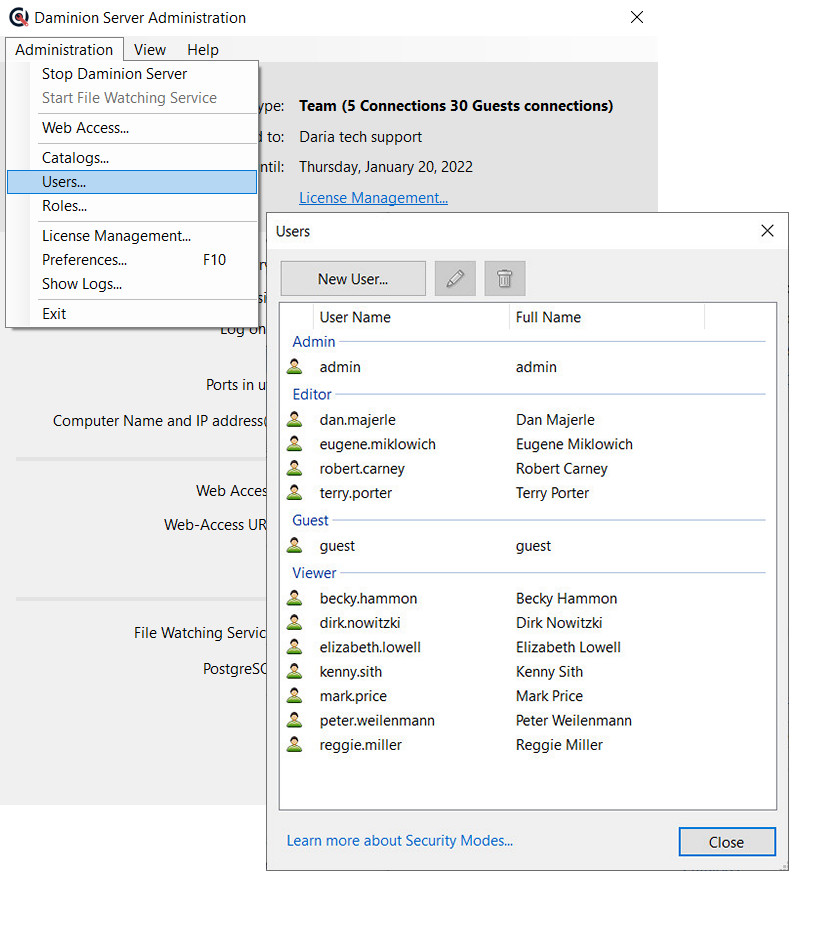
Daminion has FOUR roles:
- Guest: Has read-only access to shared catalogs. Can search and view, but can’t edit or remove assets and asset properties (tags). Export and Print features are disabled for guests.
- Viewer: All Guest rights and can Export, Print, Compare Images, Show Last Imported Files, Show All Metadata Fields, Access to “Item > Actions” menu items.
- Editor: All Viewer rights and can upload new assets to catalogs, edit and manage tags. Assign this role to person(s) who are responsible for organizing your catalogs.
- Administrator: All Editor rights and some administrative capabilities. Can adjust and lock import settings for others. Can specify who can view which assets and adjust Auto-Rescan params.
Note: Users and Roles are configured at the Server level (from the Daminion Server administration panel) or via Web-Client. If you created a user with an Editor role, he will be an editor for all the catalogs on the server.
You can also deny access to certain users for certain catalogs.
Protecting individual documents
You can restrict access to individual documents, so that only certain users or groups of users are allowed to see them.
For example, if several designers or architects are working on different projects, you can specify who can access which documents. So, specialists will not see each other’s documents unless the administrator allows them to do so.
How to protect access to documents
- Launch the Daminion Client and connect to your shared catalog
- Go to the main menu “Catalog” and select the “Access Control” option
- You will see that all Daminion Users are listed below the Access Control option in the Catalog Tags
Only the administrator can see all existing groups. Other users will see the Public, Private and groups where they were included.
Users can be put into groups. To make files either public or private for certain groups of users simply drag them to an appropriate tag in the Access Control section of your Catalog Tags tree or right click on the selected items and navigate to the “Set Access Permissions…” menu option