
Digital Asset Management Workflow: DAM Implementation from A to Z

Excited to get started with a digital asset management (DAM) system? Before you dive in, take a moment to map out your workflow first. This will help your team work faster, keep everyone happy, and save you money. Let’s see how to do that.
Firstly, let’s get the terminology right. Digital assets are files, large or small, used for creative, business, marketing, and operational purposes. These include images, videos, documents, and more.
You do many things with these files, either on your own or with a team: create, store, share, edit, archive, and delete. This process is known as digital asset management (DAM).
However, DAM isn’t just a label for a process. These three letters refer to digital asset management software the same way CRM and CMS refer to their respective applications. Operating systems like MS Windows or macOS are conceptually the closest thing to a DAM. A DAM system is designed to organize, manage and provide access to your organization’s digital assets, ensuring that the right people can easily find, use, and share them.
Now we’re ready to answer the burning question:

Discover How Daminion Can Work for You
So, What Exactly Is a Digital Asset Management Workflow?
When describing how a digital asset management system works, we discussed digital asset management workflows. And this is where you’ll unearth the gems of your corporate efficiency.
But first, how often do you struggle with these challenges:
- Finding the right project files on Google Drive, Dropbox, or OneDrive quickly
- Navigating individual contributions
- Juggling permissions across your project team
- Toggling back and forth between your file storage and software like Photoshop, InDesign, CAD, or 3D
- Ensuring that deliverables are approved by every stakeholder
Separately, these stumbling blocks may not seem like a big deal, but their cumulative effect can quickly intensify.
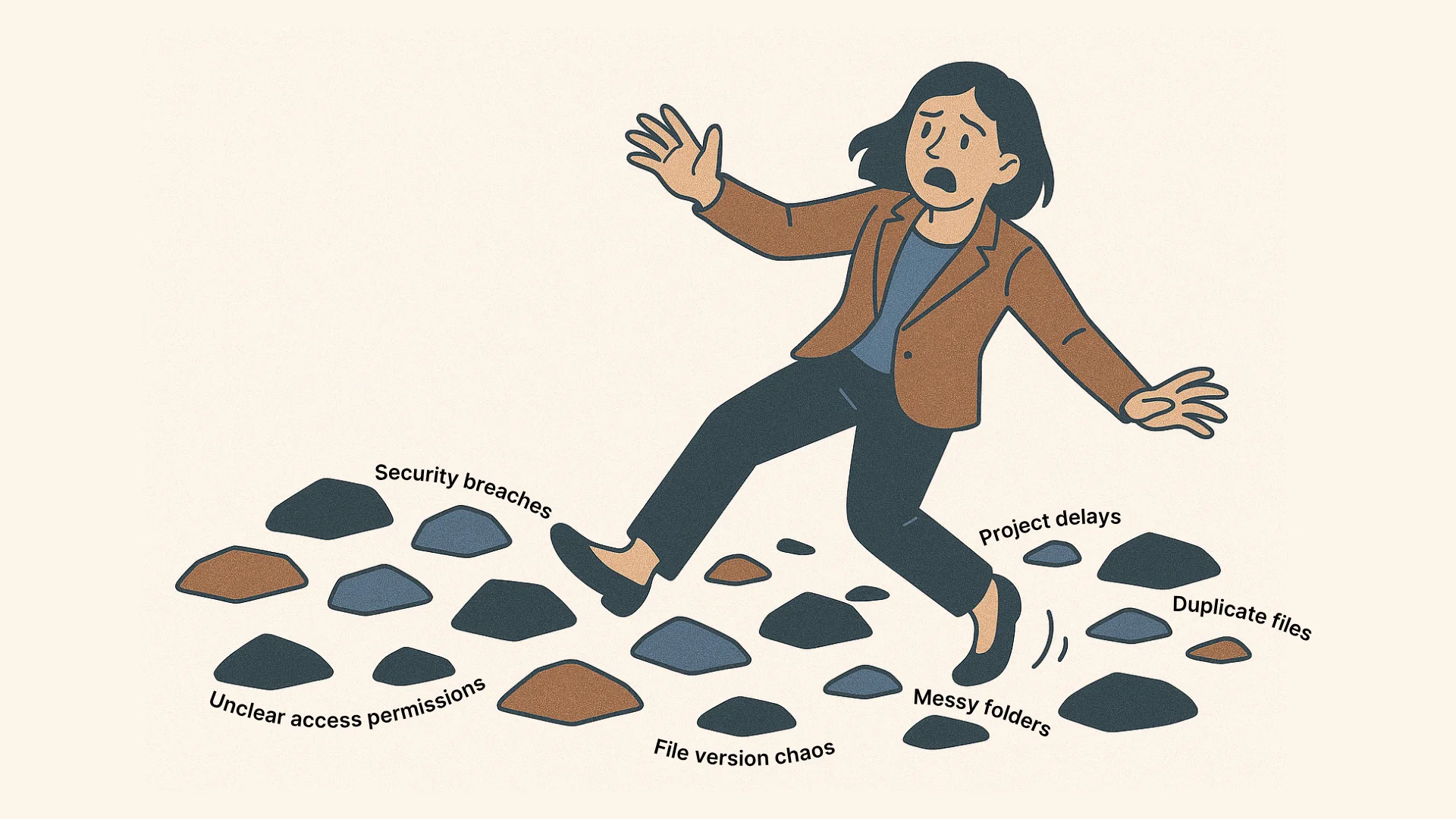
Having to wait until the system administrator grants you access to a file is annoying. The money gets stuck in the pipeline, the momentum is lost. And if you play it fast and loose to avoid these delays, you might find yourself in court one day.
Teams increasingly recognize that software can help improve their processes by removing these stumbling blocks. In 2025, the DAM market is valued at approximately $5-6.46 billion and growing at 14.2% per year.
But how do you get the most out of your DAM? Tame the project file chaos—introduce a DAM workflow based on the lifecycle of your digital assets.
Key Stages of the Digital Asset Lifecycle
The digital asset lifecycle begins when you create or upload a file and ends when you archive or delete it. A more detailed breakdown may look like this:
- Creation: Create a file or copy an external file into your workspace.
- Organization: Move the file into the appropriate folder and make it searchable by assigning tags, categories, and other taxonomy used within your workspace.
- Distribution: Make sure all collaborators know the file is there and can work with it.
- Archiving: Move the file away to prevent clutter.
Your digital asset management lifecycle might look slightly different. It may include stages like storage, use, retrieval, or deletion.
Comparing DAM and MAM: Know the Key Differences
Terminology can be confusing. You might call project files media assets, but these are not the same thing as digital assets.
Simply put, every media asset is a digital asset, but the reverse isn’t true. Small images, HTML files, and documents are digital assets but not media assets. Large videos and images belong to both categories.
A media asset management workflow isn’t much different from a digital asset management workflow. But you might use different software for them: a MAM or a DAM respectively.
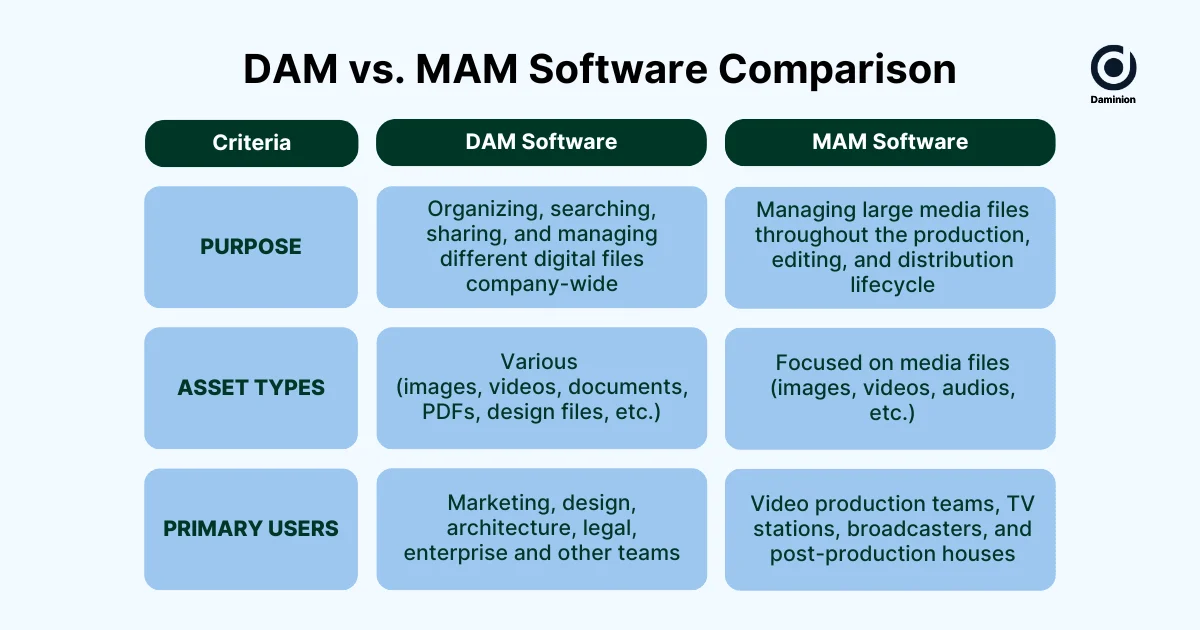
Use a MAM if you are a sports broadcaster, film producer, or news organization dealing with large media files in the works, including raw footage, clip versions, and rough cuts. MAM systems support timecode metadata, version control, and other features tailored to media-heavy, editing-intensive workflows.
A DAM system is more general-purpose, serving as the source of truth for usable, approved assets. Think of it as a smart replacement to Google Drive or Dropbox for organizations with diverse file needs: government organizations, architectural bureaus, real estate companies, and not-for-profits. DAMs are well-suited for handling images, videos, documents, presentations and more.
However, there’s also software like Daminion: designed to be successfully used in both MAM and DAM situations.
So, what type of system is right for you? If your answer is a DAM, keep reading.
A Closer Look at the Core Components of a DAM Workflow
Before creating a DAM workflow, make sure you understand what its most important components are.
1. Centralized Library
This is where you store your digital assets. It’s a hub through which all collaborators can access project files and work on them together.
There are two types of DAM libraries based on how files are stored: on-premise and cloud. Cloud storage is for digital assets that are lightweight or small in numbers.
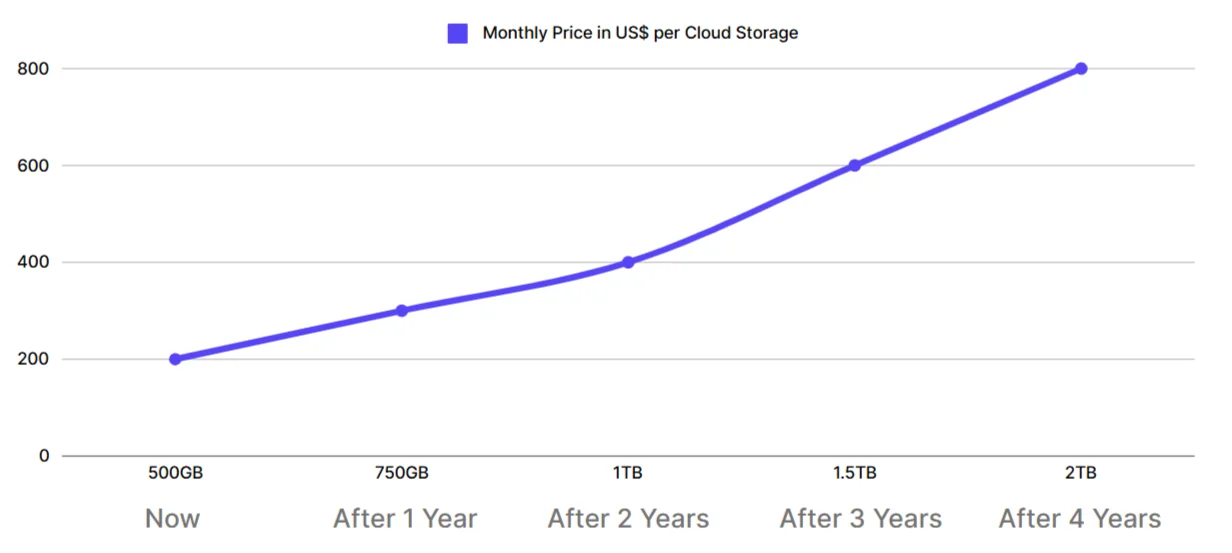
On-premise software like Daminion works best when cloud space costs more than hardware or security protocols are strict.
2. Metadata and Taxonomy
Taxonomy has nothing to do with taxes—and everything to do with how quickly and easily you find your digital assets. This term refers to categorizing and organizing objects, concepts, or entities into a hierarchical structure.
Right now, you might be cataloging your files using a system of folders and subfolders in the cloud or on a network-attached server (NAS). For example: Photos ⇒ Event Photos ⇒ 2025 Event Photos ⇒ ABC 2025 Conference Photos.
A DAM offers a better, multidimensional approach to taxonomy. You organize your digital assets by assigning them attributes, such as:
- Title
- Author
- Date created
- Location
- File format
- Keywords
- Description
- Tags
- Categories
Managing attributes for each document, graphic, photo, video, or another creative asset in your workspace can get exhausting. Luckily, today’s DAMs like Daminion employ AI to automate this process.
You’re likely familiar with automated geotagging: your phone can add location data to photos you take and identify people in these photos. Daminion’s AI tools do a similar trick—and even more. They generate titles and descriptions, suggest tags and recognize text, objects, people and their emotions in images, labeling files accordingly.
3. Version Control and Approval Processes
Collaboration powers the creative process, but also adds moving parts to it. Make sure you’re in control.
A digital asset usually goes through multiple stages, changing hands until the key stakeholders approve it. Smart collaboration and governance tools help a lot here.
First, collaborators need to be able to track each other’s changes and know an asset’s current stage whenever needed.
If you’re using Google Docs, for example, you can view a document’s version history and track changes. No seals of approval, though. You can use comments, version names, and different folders to specify a document’s status, but there are no dedicated tools for that.
A DAM handles this differently. You can assign roles and permissions, and create a clear taxonomy to organize your digital assets. As a result, everyone will know exactly what they need to do and whether it’s their turn at bat.
You can also follow audit trails to see who did what and when. Audit logs will give your digital asset manager the full picture.
4. Integrations
You run your digital assets through software like AutoCAD, Adobe Suite, and others. Switching back and forth between these applications and your centralized library manually would slow you down, so make sure your DAM integrates with the software you use.
For example, Daminion’s Connector feature lets you plug your workspace into Adobe Creative Cloud and manage files within a single screen. It’s an easy way to collaborate on Photoshop and InDesign projects.
Finally, modern DAMs like Daminion support API integrations to connect with various systems, including CMS and CRM.
How to Create a DAM Workflow Step by Step
DAMs are powerful tools. They can give you a new sense of freedom, but require an initial time investment. It starts with setting up a DAM workflow.
This process might feel complex at first, but this is a classic case of things being difficult before they become easy. Here’s a blueprint for creating your DAM workflow.
Step 1: Audit Existing Assets and Needs
Start by reviewing and documenting your current processes and needs. Consider the following:
- The file formats you typically work with
- The size of your team
- Software your team uses
- Your typical digital asset lifecycle
Once this is done, you’ll know how to structure your digital assets using various attributes. But there’s another extremely important thing to do:
Step 2: Decide Between On-Premise and Cloud Storage
Cloud-based solutions are increasingly dominating every sector, and DAMs are no exception.
If your team is large and scattered across the world, having 24-hour access to the central digital asset library is non-negotiable. You have to store your files in the cloud.
This approach also suits organizations whose needs vary from month to month. You’ll benefit from the ability to upgrade and downgrade your storage space provided by clouds. This will save you money.
If cloud solutions do so well, why would you even consider managing your digital assets locally? By using an on-premise storage with a DAM like Daminion, you:
- Retain full control over your data
- Comply with strict regulations and data protection requirements
- Don’t need to pay rent on your storage—you own it
- Save money over time, especially if you need a lot of storage space
So, choose the type of storage that works best for you and select a DAM accordingly.
Step 3: Automate Metadata Population and Tagging
Productivity skyrockets when your team can locate digital assets quickly through metadata and tags. To configure these attributes for each file easily, tap into your DAM’s automation features.
Start by appointing a digital asset manager to create a list of attributes for everyone to use. Once the list is ready, you can automate metadata population and tagging.
Daminion enables this with its AI tagging feature. When you upload a digital asset, you get tags and metadata suggestions, which you can accept or refuse.
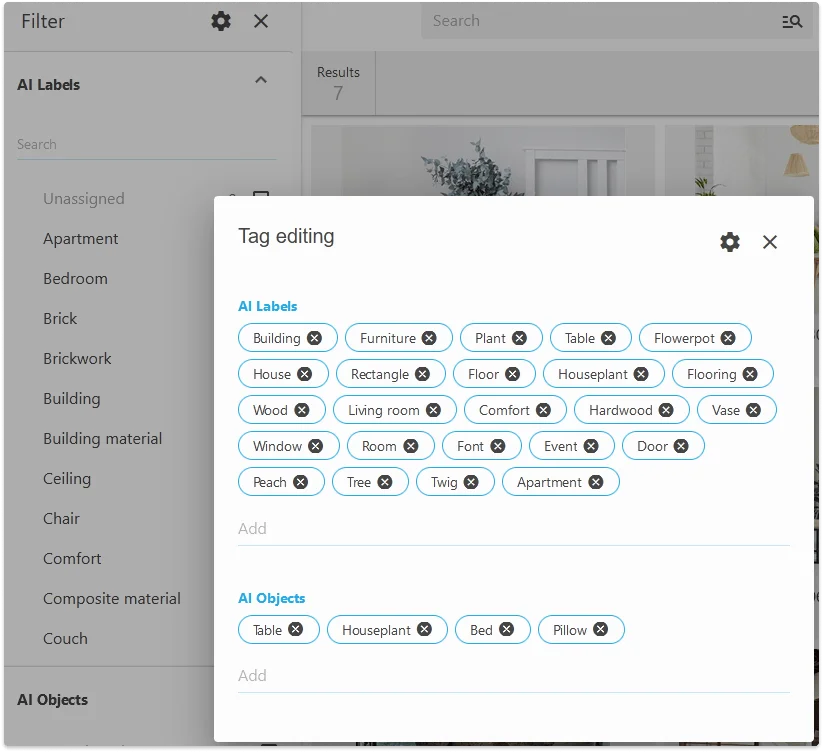
You will also benefit from automated tagging if you have accumulated a lot of files over the years. Finally, they can all be ordered with little effort.
Step 4: Collect Your Digital Assets in the Centralized Storage
Creative assets are often siloed across computers and cloud storage spaces—bring them all together in one place.
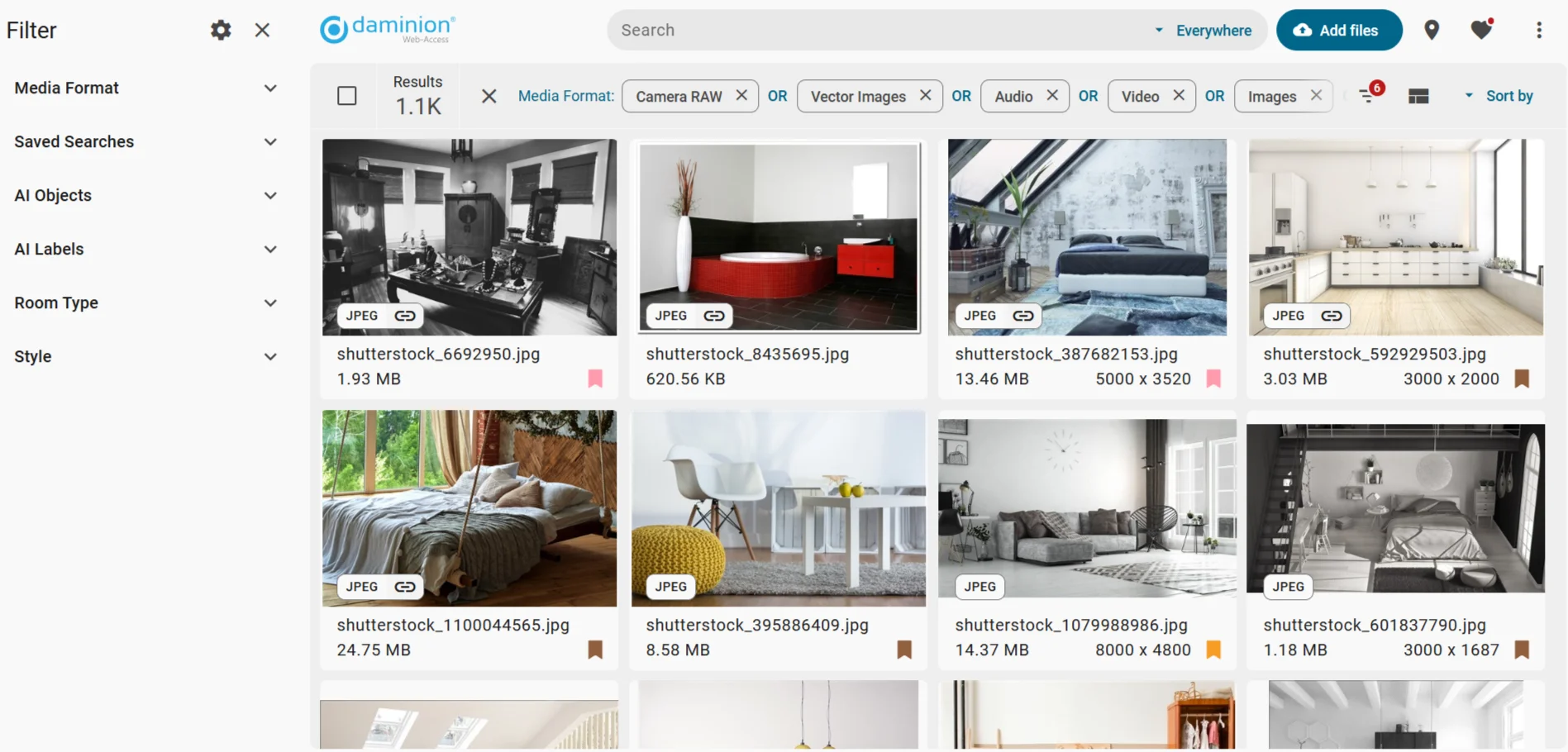
Some assets may only exist in physical form. As you create your DAM workflow, make sure to digitize all your paper documents, drafts, plans and notes.
Step 5: Document Your DAM Workflow
At this point, you’ve documented the types of digital assets you work with, decided where to store them, and automated your metadata. It’s time to document your new workflow.
What does a DAM workflow look like? It’s a sequence of steps team members make throughout a digital asset’s lifestyle within the DAM. By documenting this sequence, you create a single point of reference for everyone to rely on.
Step 6: Train Teams and Set Permissions
You can’t just document your workflow and expect everyone to automatically stick to the rules. Successful digital asset management implementation rests on four pillars:
- Team buy-in
- Training
- Enforcement
- Distribution
While the first three depend on your management style and company culture, the fourth is more or less similar across different organizations.
Within a DAM, permissions are distributed based on user roles. Here are some of the typical roles of a file library’s users:
- Creators upload or save digital assets in a DAM. It could be photographers, designers, CAD technicians, draftspeople, illustrators, and other content makers.
- Editors tweak digital assets to move them closer to the desired vision.
- Reviewers like managers or product owners check assets and provide feedback to edit them further toward final versions.
- Approvers put their digital stamps on an asset, signaling to the project team no more edits are needed and the asset can be put to use. Executives or team leaders can take upon these responsibilities.
- Publishers put the approved assets to use by uploading them or sharing them with concerned parties.
- Administrators, a.k.a. power users, manage the taxonomy, ensure everyone has the right permissions and no old assets are cluttering the workspace. You can also call these people digital asset managers.
To put these roles in perspective: if you are a designer, you act as a creator, and the project manager who receives your files acts as a reviewer.
When researching on this topic, we asked Stacey Jurgensen, a DAM expert with 20+ years experience in working with DAM, digital media products, and operational workflows, to share her insights on DAM and team management: “Training is important, but equally vital is making sure users can easily find documentation and refreshers later. Keep communication active and fun: use newsletters with funny GIFs and highlight your DAM champions. It shows users there’s a real team behind the system, and fosters adoption.”
DAM workflows and training expert. My superpower is flexing my video expertise, from file types, codecs, and problem solving. I love teaching and training teams to be able to do the same.
As Stacey pointed out, this human element is often what separates a failed rollout from a successful, scalable DAM adoption. That’s why Daminion team provides onboarding assistance, training materials, and a responsive support team—so your users never feel left on their own. Whether through video tutorials, documentation, or direct help from our team, we’re here to make sure your DAM workflow sticks.
Daminion’s DAM Workflow: Privacy, Speed and Creative Freedom
Different DAMs might focus on different aspects of a typical workflow. Daminion, for example, prioritizes privacy and speed while enabling creative freedom. Here’s what it looks like in practice:
1. Full Asset Security and Control With On-Prem
Unlike cloud-based DAM solutions that store your data on third-party servers, Daminion keeps your files stored locally.
This gives you:
- Complete control over your assets: No third-party access or vendor lock-in
- Faster file access: Large files open and load without relying on external bandwidth
- Long-term cost savings: No recurring cloud storage fees for your growing archive
And when you’re ready to move on, you keep your files without any export struggles or missing metadata.
Daminion offers two on-premise plans: annual and lifetime. The latter is popular with nonprofits because they often work with fixed budgets and prefer not to deal with recurring payments.
2. Made for Creative Teams to Thrive
Creative teams love Daminion because they don’t need to switch between the DAM and Adobe software, thanks to the Adobe Creative Cloud integration.
The process is simple:
- Browse, preview, and drag files from the DAM directly into Photoshop, Illustrator, or InDesign
- Maintain version control and metadata without leaving your design tools
- Easily retrieve past iterations or related files for reuse
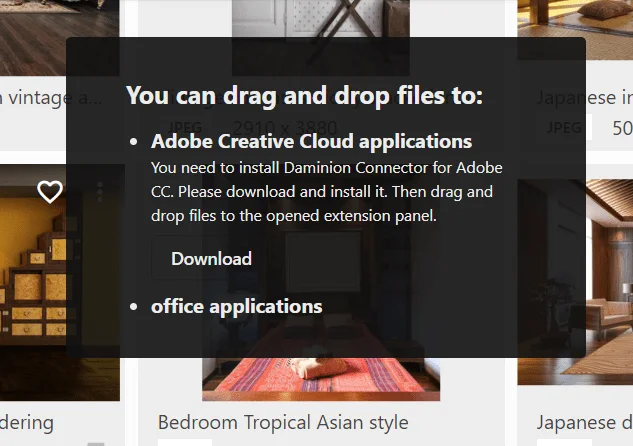
For your team, this means less time searching and switching, and more time creating!
3. Fast and Lightweight by Design
Daminion acts as a smart layer on top of your existing local storage, which indexes your media assets without duplicating them.
- No need to upload files to a separate system
- Searches return results instantly, even in large libraries
- Works smoothly with network drives and shared folders
Whether you’re a creative director, archivist, or IT manager, Daminion helps you stay in control without slowing down your workflow.
Key Takeaways
A DAM can help you prevent chaos, boost productivity, and save money. But you need to have efficient workflows in place.
When creating a DAM workflow, consider your typical digital asset lifecycle. Your team size, file formats, data privacy needs, and the software you use matter too.
Finally, tap into AI-powered automation and train your team to follow the new workflow to get the most out of it.
If you value privacy, speed and creative freedom, check out Daminion—an on-premise solution integrated with services like Adobe Creative Cloud and powered by AI.
Book a no-obligation call with Daminion team to find out if it’s right for you.
Getting Started with Daminion
Store, tag, search, and share media assets like never before

Explore our DAM system
with your personal manager
demo from your dedicated manager.