Import to Folder
How to Import Files to a Selected Folder
Upload Files to a Folder
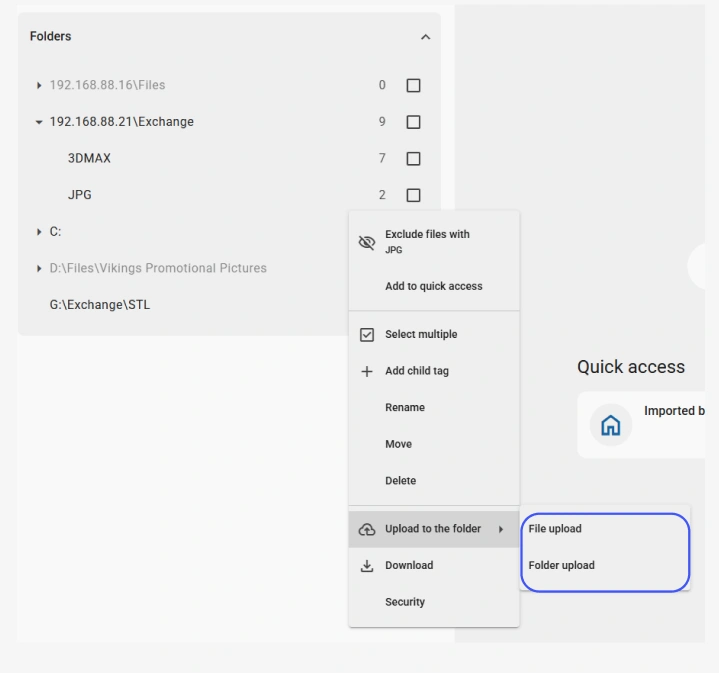
Expand the Folders tab in the Tags panel and right-click your destination folder.
Select Upload to the folder > File Upload from the context menu.
Browse and select the files you want to import. They will be added directly to that folder in the catalog.
Upload a Folder with Its Structure
If you want to import an entire folder along with all its contents and subfolders, right-click your destination folder and select Upload to the folder > Folder upload .
This imports the complete folder hierarchy, preserving the original folder structure in your Daminion catalog.
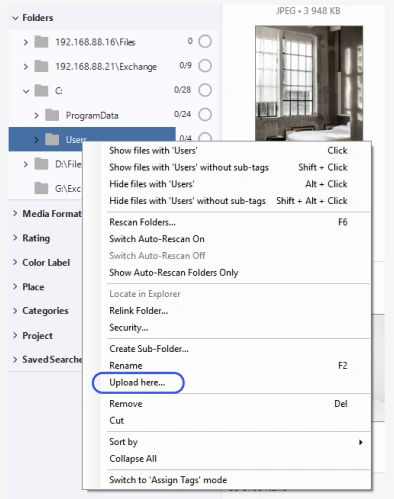
Upload Files to a Folder
Expand the Folders tab in the Tags panel and right-click your destination folder.
Select Upload here from the context menu.
Browse and select the files you want to import. They will be added directly to that folder in the catalog.