How to migrate from Canto Cumulus
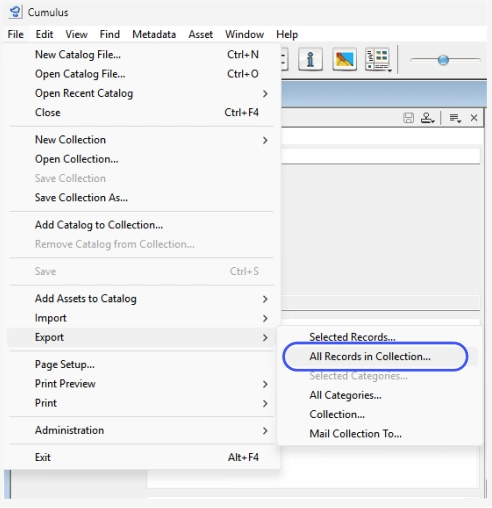
In the menu, select File > Export > All Records in Collection.
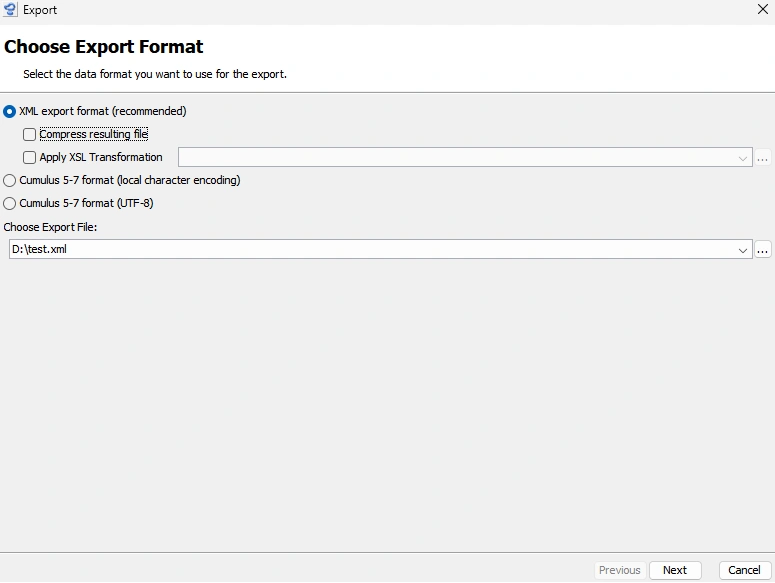
Set the radio buttons as shown in the screenshot
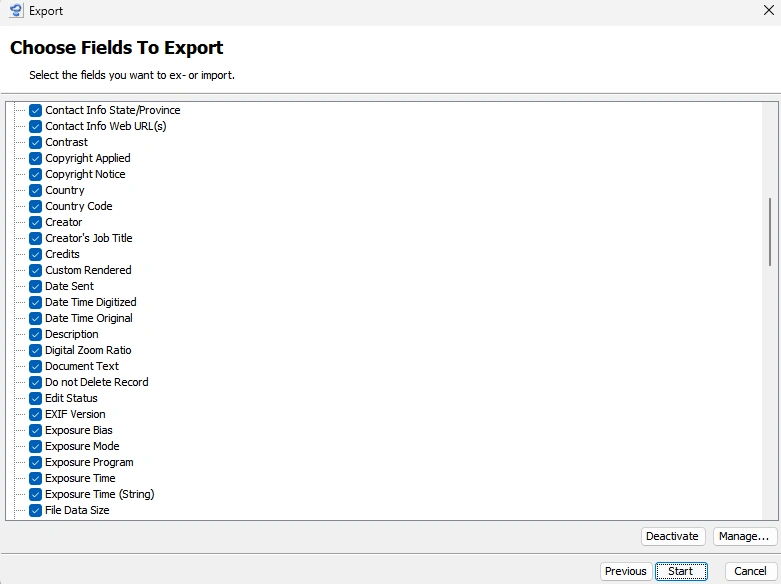
Select the metadata you wish to export.
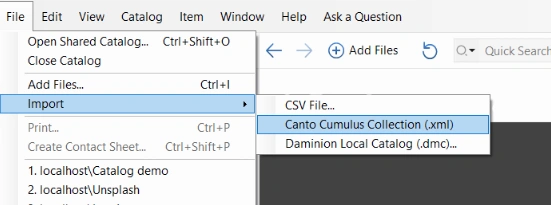
click on File > Import > Canto Cumulus Collection (.xml)
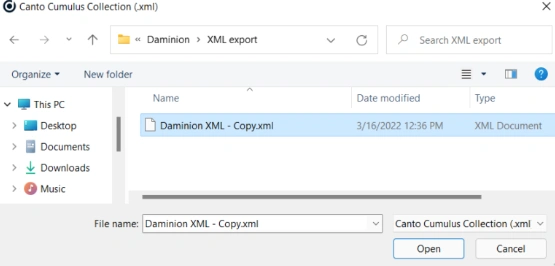
Browse for the .XML file exported from Canto Cumulus, select it and click “Open”
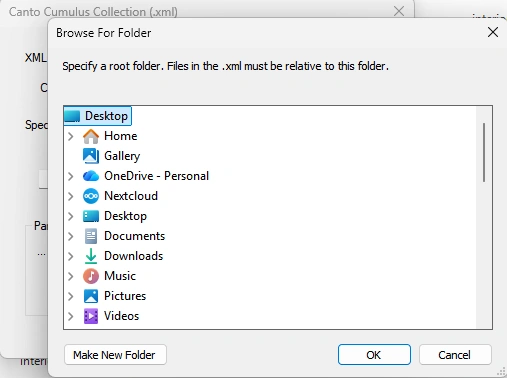
n the window that opens, navigate to the root folder where the original media files are stored.
For example, if the files are stored on a file server in the following file structure
\\File-Server > MediaFiles >
> MediaFolder1
> MediaFolder2
> MediaFolder3
The root folder will be “\\File-Server\MediaFiles”
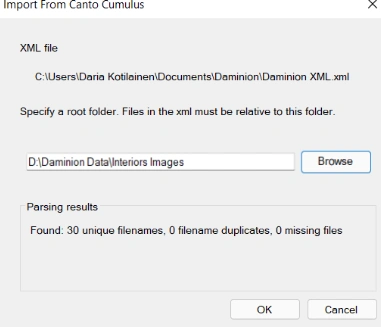
If the root folder is specified correctly, Daminion will analyze the .XML file and indicate the number of unique files, duplicate files, and missing files. Missing files can be skipped in the next step and excluded from import.
If all files are missing, double-check the accuracy of the root folder.
Select the tag mappings between Cumulus and Daminion and confirm your choice.
If you have any doubts about the mapping, read the description of the mapping processor below.
Check the mappings carefully; this is a one-way process, and any errors will require deleting records from the catalog and re-importing them.
After the import is complete, selectively check the files for tag consistency.
Metadata Import Process
Once you confirm the metadata mapping and start the import, Daminion follows these rules:
Step 1: Analyze Embedded Metadata
Daminion first extracts all embedded metadata from the files, including:
- File System properties
- EXIF data
- IPTC tags
- XMP metadata
Step 2: Apply XML Mapping Rules
If metadata in the XML file matches your mapping rules, it updates the imported file's metadata according to these rules:
Multi-Value Tags (Keywords, Categories) — Values from the XML file are added to the embedded values. Both sets of data are preserved.
Single-Value Tags (Title, Copyright) — The XML value replaces the embedded value.
Example
A file's embedded metadata contains:
XMP:Title: Restaurant interior – rustic styledThe XML file contains:
Title: Interior Design of a Rustic Styled Restaurant, Alabama, 2018If you mapped the "Title" field for import, the final imported file will have:
Title: Interior Design of a Rustic Styled Restaurant, Alabama, 2018The XML value replaces the original embedded title.
Metadata Mapping Rules
Automatic Mapping
Standard metadata fields such as Keywords, Categories, and Copyrights are mapped automatically when you import an XML file into Daminion.
Unrecognized Fields
Some metadata fields from your XML file may be recognized by Daminion but marked as "Do not copy." This happens when the required tag parameters don't exist in Daminion and cannot be transferred correctly from the XML file.
Creating Custom Tags
When you encounter unmapped fields, you need to create a matching custom tag in Daminion. Ensure the custom tag has the correct parameters to properly receive the imported metadata.
Example: Approval Status
In Canto Cumulus, you might have a custom tag called "Approval Status" with limited values: "Approved," "Waiting for Approval," or "Rejected." To import this tag into Daminion, create a custom tag with the format "Text" and enable the option "Tag has a limited number of values that can be assigned to multiple files."
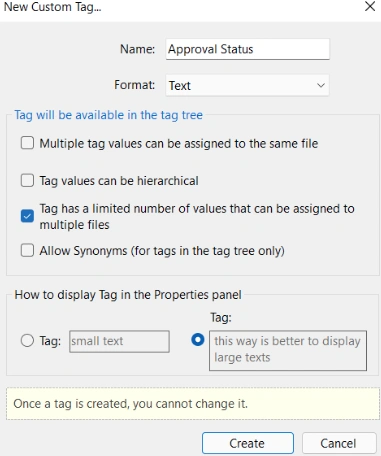
Learn more about Custom Tags here
Hidden Metadata Fields
Displaying Embedded Metadata
Some Canto Cumulus metadata fields don't appear in the metadata mapping window. These are typically embedded file properties such as Image Height, Image Width, and Asset Modification Date—retrievable directly from the original files.
To make these fields available for mapping, edit this file:
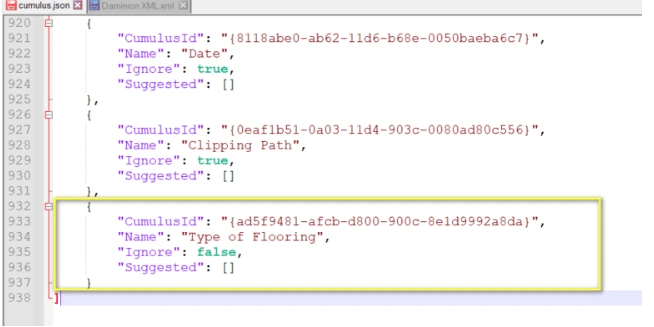
C:\Program Files (x86)\Daminion Software\Daminion\Addons\ImportFromCumulus\cumulus.json
Change "Ignore": true to "Ignore": false for any metadata field you want to map.
Adding Custom Tags from Canto Cumulus
Custom tags from Canto Cumulus may not be added to cumulus.json automatically and won't appear in the metadata mapping window. You'll need to add them manually.
How to Add a Custom Tag:
- Open the XML file exported from Canto Cumulus
- Locate the custom tag you want to import (for example, "Type of Flooring")
- Find the tag's
uidandNameparameters - Add these parameters to
cumulus.jsonto make the tag available for mapping in Daminion